Reducing Photo Tagging Time by 76% for Camp Starfish
Streamlining Tedious Workflows Into a Scalable, Secure Platform.
(All photos displayed are shared with permission from Camp Starfish.)
Reducing Photo Tagging Time by 76% for Camp Starfish
Streamlining Tedious Workflows Into a Scalable, Secure Platform.
(All photos displayed are shared with permission from Camp Starfish.)
Reducing Photo Tagging Time by 76% for Camp Starfish
Streamlining Tedious Workflows Into a Scalable, Secure Platform.
(All photos displayed are shared with permission from Camp Starfish.)
Project & Client Overview
As the Product Designer on a cross-functional team at Hack4Impact-UMD, I led the design of a secure and scalable photo management and tagging system for Camp Starfish, a nonprofit supporting children with social-emotional challenges.
Project & Client Overview
As the Product Designer on a cross-functional team at Hack4Impact-UMD, I led the design of a secure and scalable photo management and tagging system for Camp Starfish, a nonprofit supporting children with social-emotional challenges.
Project & Client Overview
As the Product Designer on a cross-functional team at Hack4Impact-UMD, I led the design of a secure and scalable photo management and tagging system for Camp Starfish, a nonprofit supporting children with social-emotional challenges.
The Problem
Camp Starfish takes 1,500+ photos every summer, but relies on Google Drive folders to manually organize and share them. This process is slow, insecure, and frustrating for both camp staff and families.
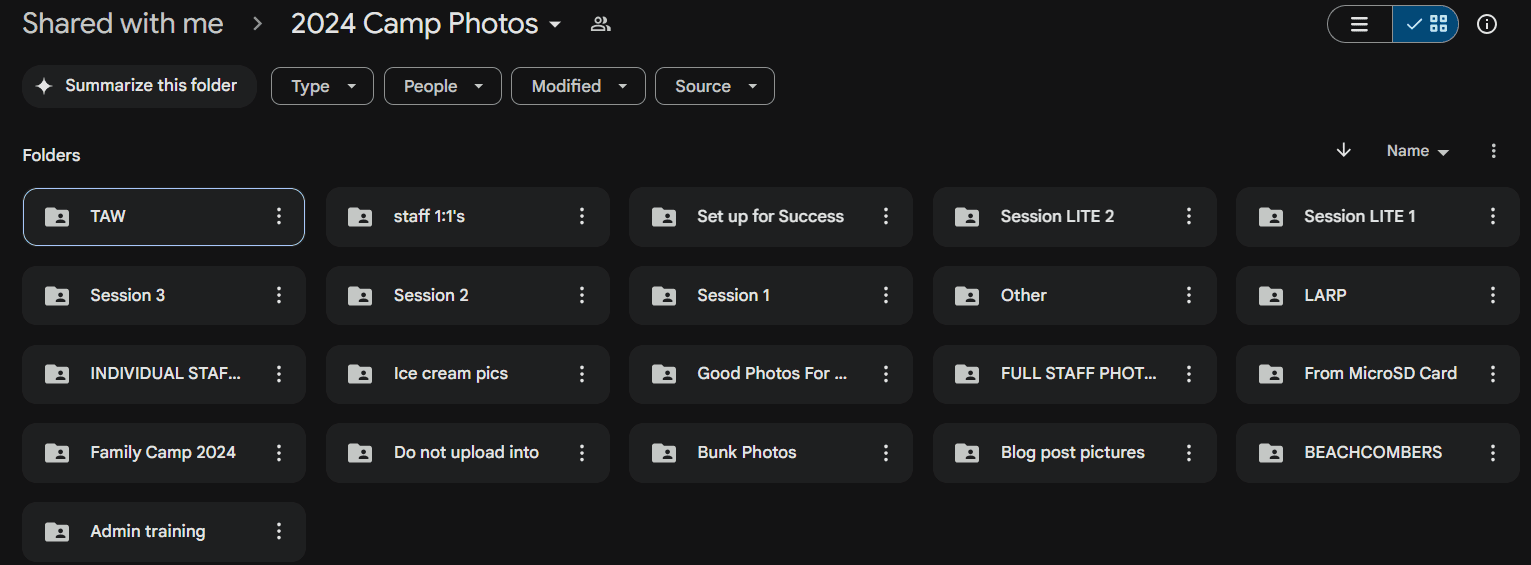
A look into Camp Starfish's old photo management system.
The Problem
Camp Starfish takes 1,500+ photos every summer, but relies on Google Drive folders to manually organize and share them. This process is slow, insecure, and frustrating for both camp staff and families.
A look into Camp Starfish's old photo management system.
The Problem
Camp Starfish takes 1,500+ photos every summer, but relies on Google Drive folders to manually organize and share them. This process is slow, insecure, and frustrating for both camp staff and families.
A look into Camp Starfish's old photo management system.
Our Solution
A personalized tagging and photo-management system was an affordable, secure, and scalable solution. Our main goals were to increase user satisfaction & reduce tagging time.
Our Solution
A personalized tagging and photo-management system was an affordable, secure, and scalable solution. Our main goals were to increase user satisfaction & reduce tagging time.
Our Solution
A personalized tagging and photo-management system was an affordable, secure, and scalable solution. Our main goals were to increase user satisfaction & reduce tagging time.
The Impact
We reduced photo tagging time by 76% — from 8 hours to 30 mins
…making it easier for staff to upload, organize, and share photos — and for parents to securely access their child’s camp memories.
…making it easier for staff to upload, organize, and share photos — and for parents to securely access their child’s camp memories.
Team
3 Designers, 2 PMs, 2 Tech Leads, 8 Engineers
Timeline
Feb – May 2025 (3 months, ongoing)
Tools
Figma, FigJam, Lucidchart, AI Plugins
Team
3 Designers, 2 PMs, 2 Tech Leads, 8 Engineers
Timeline
Feb – May 2025 (3 months, ongoing)
Tools
Figma, FigJam, Lucidchart, AI Plugins
Team
3 Designers, 2 PMs, 2 Tech Leads, 8 Engineers
Timeline
Feb – May 2025 (3 months, ongoing)
Tools
Figma, FigJam, Lucidchart, AI Plugins
Project Design Process in a Nutshell
Project Design Process in a Nutshell
Project Design Process in a Nutshell
1.
Research
2.
Ideation
3.
Wireframes
& Prototypes
4.
Iteration & User Testing
5.
Branding & UI
1.
Research
2.
Ideation
3.
Wireframes
& Prototypes
4.
Iteration & User Testing
5.
Branding & UI
1.
Research
2.
Ideation
3.
Wireframes
& Prototypes
4.
Iteration & User Testing
5.
Branding & UI
Exploring Key Pain Points
After stakeholder interviews, we gained valuable context around Camp Starfish’s photo management process and uncovered the following key user pain points:
1.
Time-Consuming Tagging
One intern spent ~8 hrs/day tagging images…
2.
Poor Organization
Duplicates, lost images, and inconsistent labeling.
4.
Lack of Scalable Tools
Existing tools like CampMinder were expensive and inflexible.
3.
Privacy Concerns
Managing image permissions in Google Drive increased risk of accidental oversharing, raising important privacy concerns.
4.
Cost & Lack of scalable tools
Existing tools like CampMinder were expensive and inflexible.
Exploring Key Pain Points
After stakeholder interviews, we gained valuable context around Camp Starfish’s photo management process and uncovered the following key user pain points:
1.
Time-Consuming Tagging
One intern spent ~8 hrs/day tagging images…
2.
Poor Organization
Duplicates, lost images, and inconsistent labeling.
4.
Lack of Scalable Tools
Existing tools like CampMinder were expensive and inflexible.
1.
Time-Consuming Tagging
One intern spent ~8 hrs/day tagging images…
4.
Cost & Lack of scalable tools
Existing tools like CampMinder were expensive and inflexible.
Exploring Key Pain Points
After stakeholder interviews, we gained valuable context around Camp Starfish’s photo management process and uncovered the following key user pain points:
1.
Time-Consuming Tagging
One intern spent ~8 hrs/day tagging images…
3.
Privacy Concerns
Managing permissions for individual images increased risk of accidental oversharing, raising important privacy concerns.
4.
Lack of Scalable Tools
Existing tools like CampMinder were expensive and inflexible.
3.
Privacy Concerns
Managing image permissions in Google Drive increased risk of accidental oversharing, raising important privacy concerns.
4.
Cost & Lack of scalable tools
Existing tools like CampMinder were expensive and inflexible.
“I had to sort through thousands of photos and manually email them to families.”
-- Camp Starfish Admin
“I had to sort through thousands of photos and manually email them to families.”
-- Camp Starfish Admin
“I had to sort through thousands of photos and manually email them to families.”
-- Camp Starfish Admin
Which led us to question: How might we create a solution tailored to Camp Starfish's specific photo management needs?
Which led us to question: How might we create a solution tailored to Camp Starfish's specific photo management needs?
Which led us to question: How might we create a solution tailored to Camp Starfish's specific photo management needs?
We gained important insight from existing workflows
I led a competitive analysis of photo management apps with organization, tagging, and sharing features, which helped us evaluate the pros and cons of certain features. I referenced Google Drive's file and album-based photo management features. Flickr's user roles and community-based photo sharing helped us understand how public/private visibility is handled at scale. Lightroom is designed to manage lots of images; its features inspired our design within the camp’s user context.

Google Drive & Photos

Flickr

Lightroom
We gained important insight from existing workflows
I led a competitive analysis of photo management apps with organization, tagging, and sharing features, which helped us evaluate the pros and cons of certain features. I referenced Google Drive's file and album-based photo management features. Flickr's user roles and community-based photo sharing helped us understand how public/private visibility is handled at scale. Lightroom is designed to manage lots of images; its features inspired our design within the camp’s user context.
Google Drive & Photos
Flickr
Lightroom
We gained important insight from existing workflows
I led a competitive analysis of photo management apps with organization, tagging, and sharing features, which helped us evaluate the pros and cons of certain features. I referenced Google Drive's file and album-based photo management features. Flickr's user roles and community-based photo sharing helped us understand how public/private visibility is handled at scale. Lightroom is designed to manage lots of images; its features inspired our design within the camp’s user context.
Google Drive & Photos
Flickr
Lightroom
1.
Research
2.
Ideation
3.
Wireframes
& Prototypes
4.
Iteration & User Testing
5.
Branding & UI
1.
Research
2.
Ideation
3.
Wireframes
& Prototypes
4.
Iteration & User Testing
5.
Branding & UI
1.
Research
2.
Ideation
3.
Wireframes
& Prototypes
4.
Iteration & User Testing
5.
Branding & UI
Brainstorming and Ideation of Various Solutions
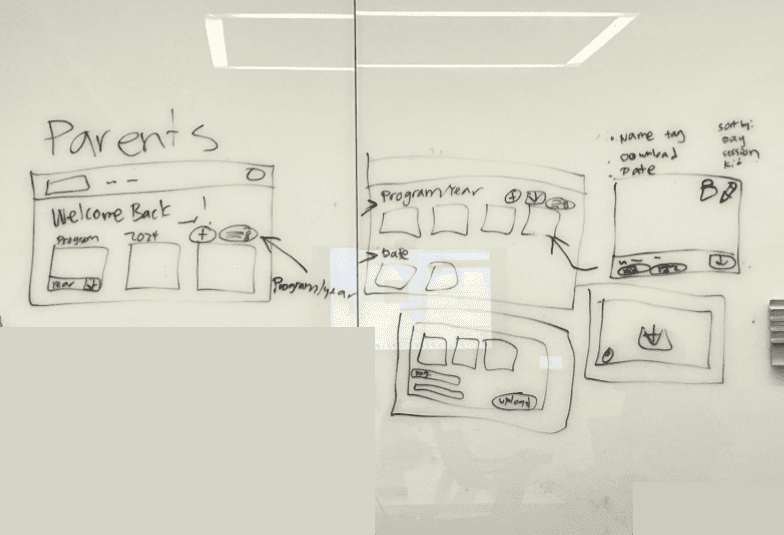
Our Product Team held weekly meetings to discuss early user flows.
I sketched wireframes on the whiteboard during cross-functional workshops to guide discussions on user flows, early features, and layouts, visualizing how they’d work together to support user goals. .
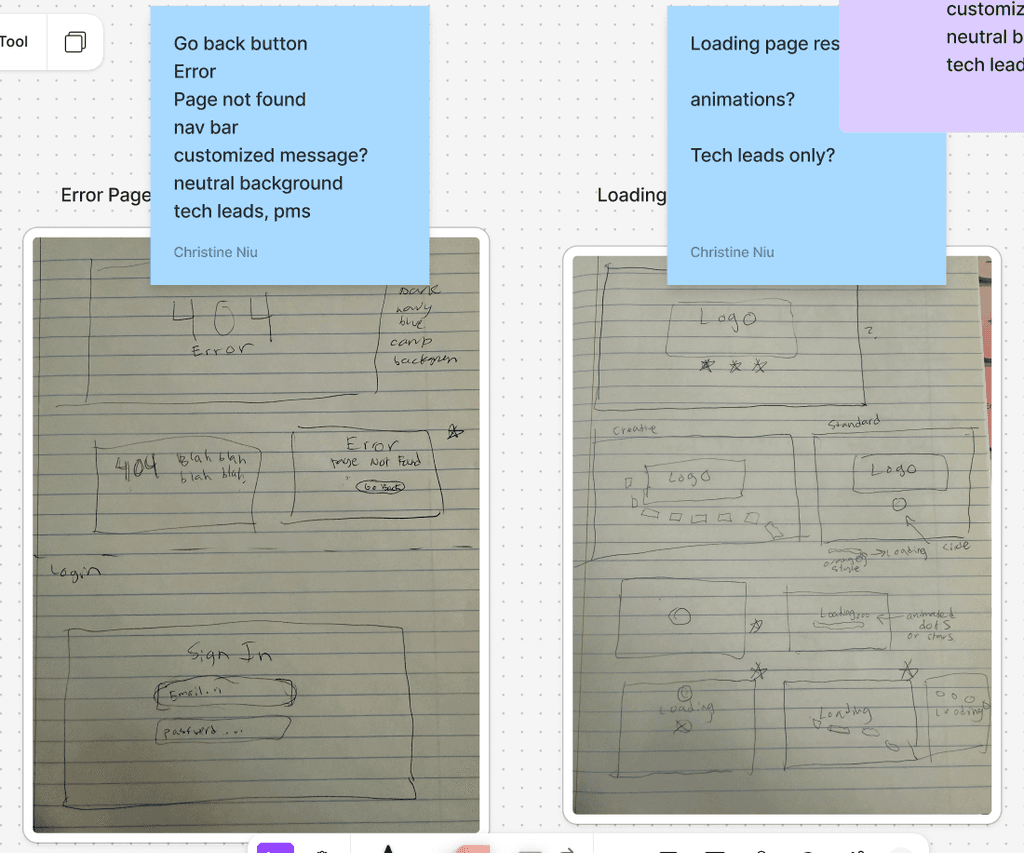
Designer Ideation in Figjam. I enjoy designing products, but I also love exploring creativity!
I sketched out some creative concepts and animations for the error, login, and loading pages. I wanted to design for moments that are often overlooked in the user journey, especially since camp parents and kids will be using the application.
Brainstorming and Ideation of Various Solutions
Our Product Team held weekly meetings to discuss early user flows.
I sketched wireframes on the whiteboard during cross-functional workshops to guide discussions on user flows, early features, and layouts, visualizing how they’d work together to support user goals. .
Designer Ideation in Figjam. I enjoy designing products, but I also love exploring creativity!
I sketched out some creative concepts and animations for the error, login, and loading pages. I wanted to design for moments that are often overlooked in the user journey, especially since camp parents and kids will be using the application.
Brainstorming and Ideation of Various Solutions
Our Product Team held weekly meetings to discuss early user flows.
I sketched wireframes on the whiteboard during cross-functional workshops to guide discussions on user flows, early features, and layouts, visualizing how they’d work together to support user goals. .
Designer Ideation in Figjam. I enjoy designing products, but I also love exploring creativity!
I sketched out some creative concepts and animations for the error, login, and loading pages. I wanted to design for moments that are often overlooked in the user journey, especially since camp parents and kids will be using the application.
Prioritizing User Goals & Designing Scalable User Flows
Through stakeholder interviews and team collaboration, we defined user goals, developed a product roadmap with key MVP features, and designed a unified flow for Admins, Staff, and Parents using role-based access.
Key Tasks by Role
Admins: Camp admin can upload, edit, delete, tag, and manage permission access.
Staff: Camp Staff and volunteers can tag and organize photos.
Parents: Parents can securely view and download their child's photos.
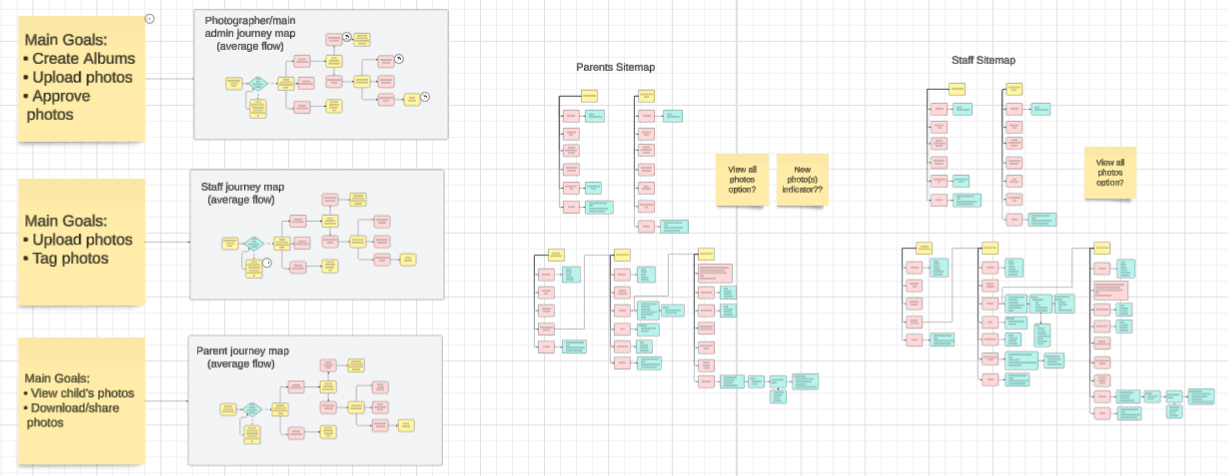
Mapping user flows and site maps for each role
Prioritizing User Goals & Designing Scalable User Flows
Through stakeholder interviews and team collaboration, we defined user goals, developed a product roadmap with key MVP features, and designed a unified flow for Admins, Staff, and Parents using role-based access.
Key Tasks by Role
Admins: Camp admin can upload, edit, delete, tag, and manage permission access.
Staff: Camp Staff and volunteers can tag and organize photos.
Parents: Parents can securely view and download their child's photos.
Mapping user flows and site maps for each role
Prioritizing User Goals & Designing Scalable User Flows
Through stakeholder interviews and team collaboration, we defined user goals, developed a product roadmap with key MVP features, and designed a unified flow for Admins, Staff, and Parents using role-based access.
Key Tasks by Role
Admins: Camp admin can upload, edit, delete, tag, and manage permission access.
Staff: Camp Staff and volunteers can tag and organize photos.
Parents: Parents can securely view and download their child's photos.
Mapping user flows and site maps for each role
1.
Research
2.
Ideation
3.
Wireframes
& Prototypes
4.
Iteration & User Testing
5.
Branding & UI
1.
Research
2.
Ideation
3.
Wireframes
& Prototypes
4.
Iteration & User Testing
5.
Branding & UI
1.
Research
2.
Ideation
3.
Wireframes
& Prototypes
4.
Iteration & User Testing
5.
Branding & UI
2-Week Sprint: Wireframing the User Flows
(The wireframes shown below were sketched by my teammate during our designer meetings.)
Streamlined Interface
For an efficient implementation and easier management of user roles, we combined the homepage for admin and staff and created a separate version for parents. All interfaces maintained a similar layout, with role-specific features like upload and edit for staff/admin.
Photo Tagging by Camper Name
Staff can upload and tag photos, and admins can manage permissions across all user roles, edit and delete albums, and approve or deny photos uploaded by camp staff.
Tradeoffs Made
We considered facial recognition to tag campers, but I raised privacy concerns due to potential legal risks with third-party data storage. After consulting our nonprofit liaison, we opted for an alternative photo tagging flow.
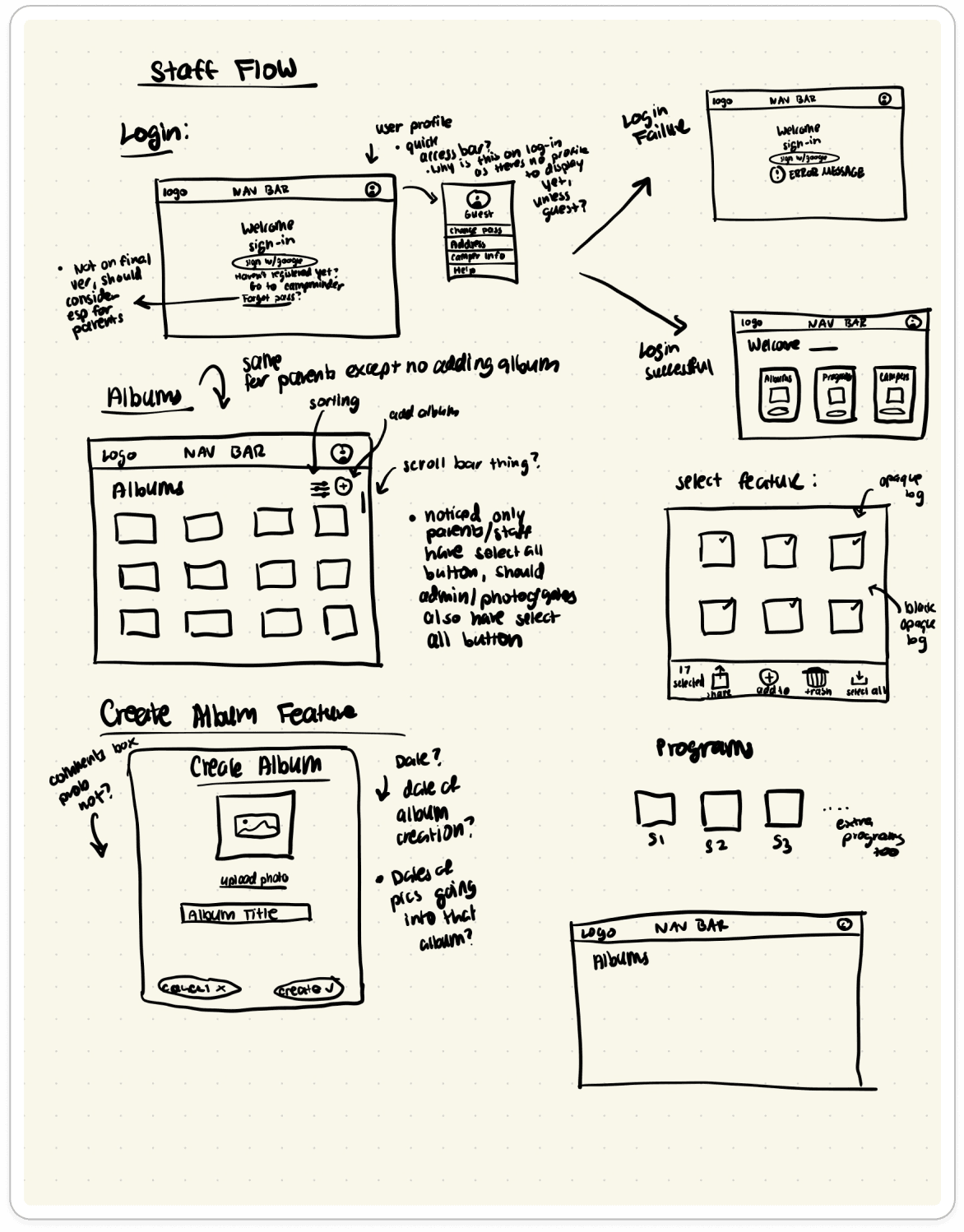
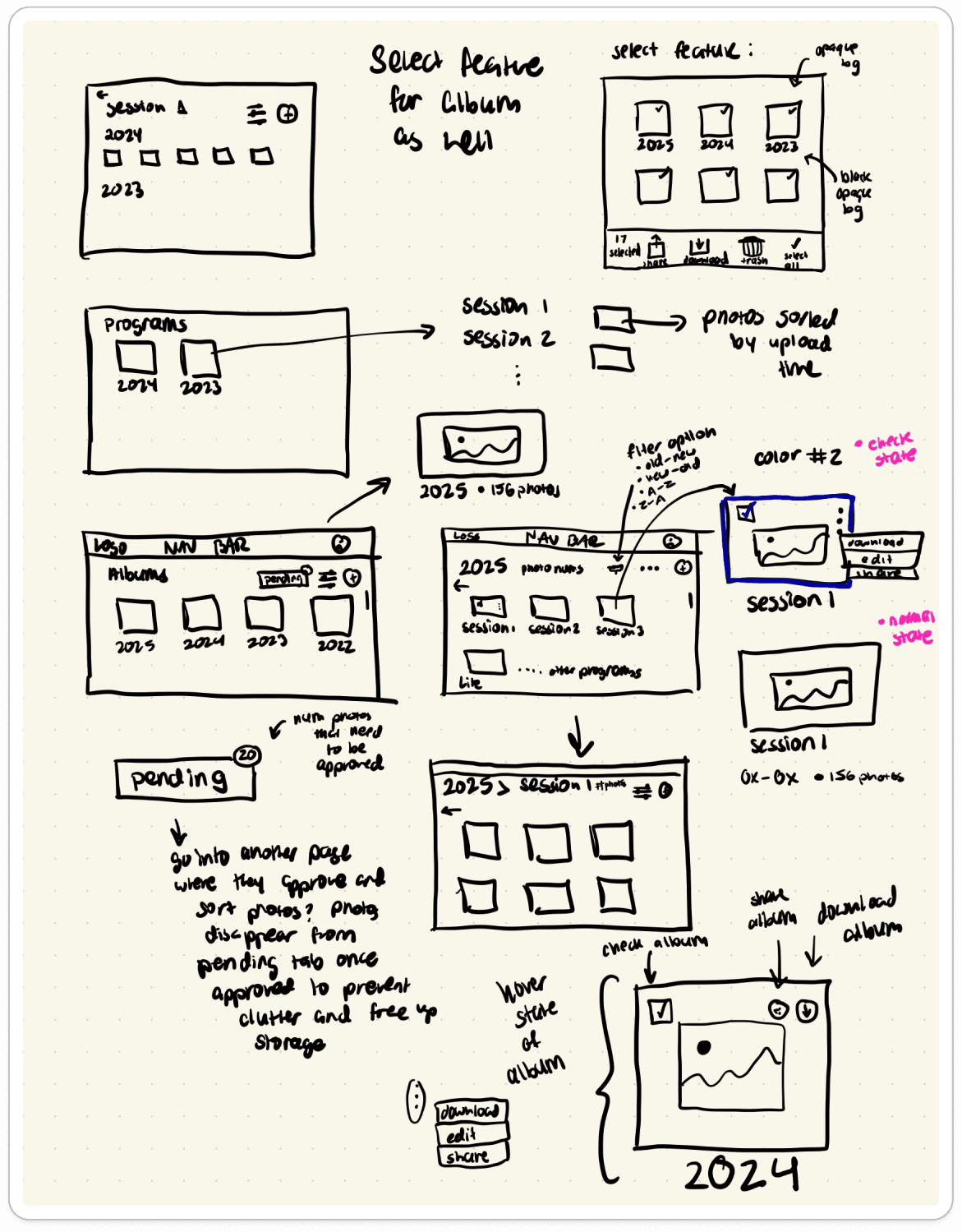
Ideation sketches for the albums pages
Pending Photos Workflow to Manage Photo Tagging and Moderation
The pending photos feature ensures that camp parents will only see photos approved by camp admin and ensures a secure photo management process.
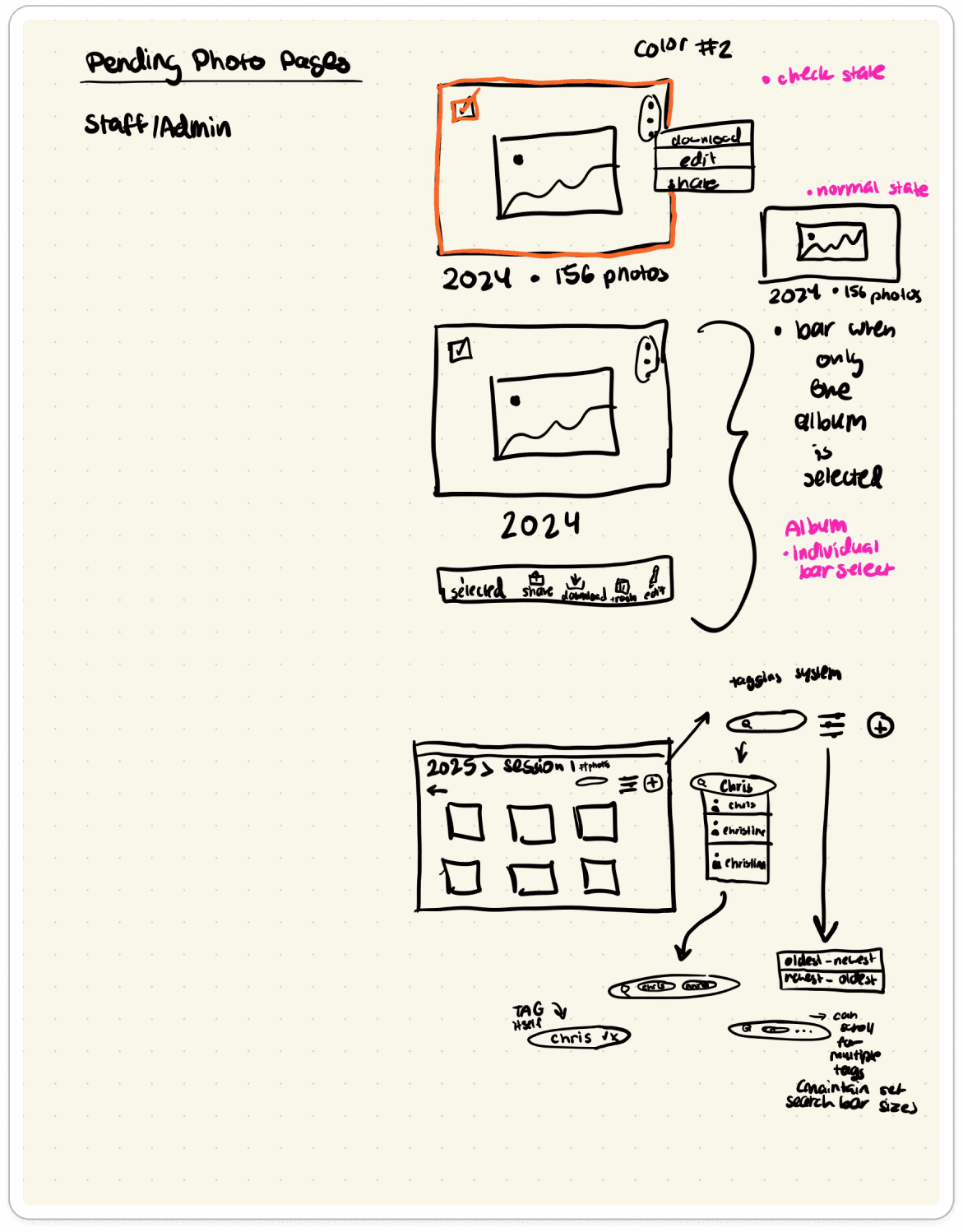
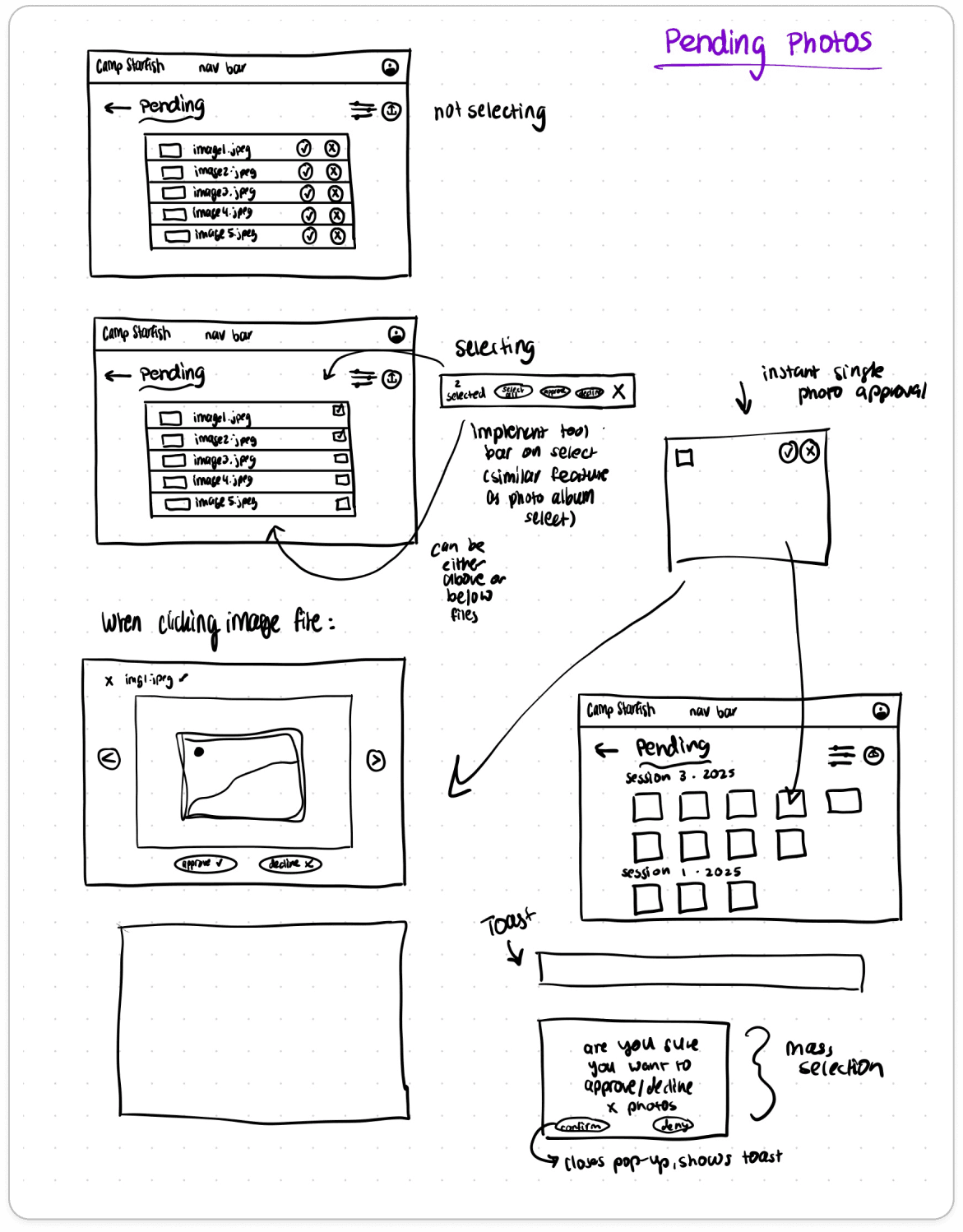
Ideation sketches for the pending photos workflow
2-Week Sprint: Wireframing the User Flows
(The wireframes shown below were sketched by my teammate during our designer meetings.)
Streamlined Interface
For an efficient implementation and easier management of user roles, we combined the homepage for admin and staff and created a separate version for parents. All interfaces maintained a similar layout, with role-specific features like upload and edit for staff/admin.
Photo Tagging by Camper Name
Staff can upload and tag photos, and admins can manage permissions across all user roles, edit and delete albums, and approve or deny photos uploaded by camp staff.
Tradeoffs Made
We considered facial recognition to tag campers, but I raised privacy concerns due to potential legal risks with third-party data storage. After consulting our nonprofit liaison, we opted for an alternative photo tagging flow.
Ideation sketches for the albums pages
Pending Photos Workflow to Manage Photo Tagging and Moderation
The pending photos feature ensures that camp parents will only see photos approved by camp admin and ensures a secure photo management process.
Ideation sketches for the pending photos workflow
2-Week Sprint: Wireframing the User Flows
(The wireframes shown below were sketched by my teammate during our designer meetings.)
Streamlined Interface
For an efficient implementation and easier management of user roles, we combined the homepage for admin and staff and created a separate version for parents. All interfaces maintained a similar layout, with role-specific features like upload and edit for staff/admin.
Photo Tagging by Camper Name
Staff can upload and tag photos, and admins can manage permissions across all user roles, edit and delete albums, and approve or deny photos uploaded by camp staff.
Tradeoffs Made
We considered facial recognition to tag campers, but I raised privacy concerns due to potential legal risks with third-party data storage. After consulting our nonprofit liaison, we opted for an alternative photo tagging flow.
Ideation sketches for the albums pages
Pending Photos Workflow to Manage Photo Tagging and Moderation
The pending photos feature ensures that camp parents will only see photos approved by camp admin and ensures a secure photo management process.
Ideation sketches for the pending photos workflow
1.
Research
2.
Ideation
3.
Wireframes
& Prototypes
4.
Iteration & User Testing
5.
Branding & UI
1.
Research
2.
Ideation
3.
Wireframes
& Prototypes
4.
Iteration & User Testing
5.
Branding & UI
1.
Research
2.
Ideation
3.
Wireframes
& Prototypes
4.
Iteration & User Testing
5.
Branding & UI
User Testing & Iterations
We conducted 5 remote usability sessions and 3 in-depth surveys across all user roles to uncover any pain points with the new user flow.
Due to time and location constraints, we utilized remote methods to test our assumptions and ensure the design fulfilled user needs.
We had users run through tasks such as:
Uploading + tagging (admin/staff)
Viewing albums (parents)
Navigation + photo management (all roles)
Some key findings:
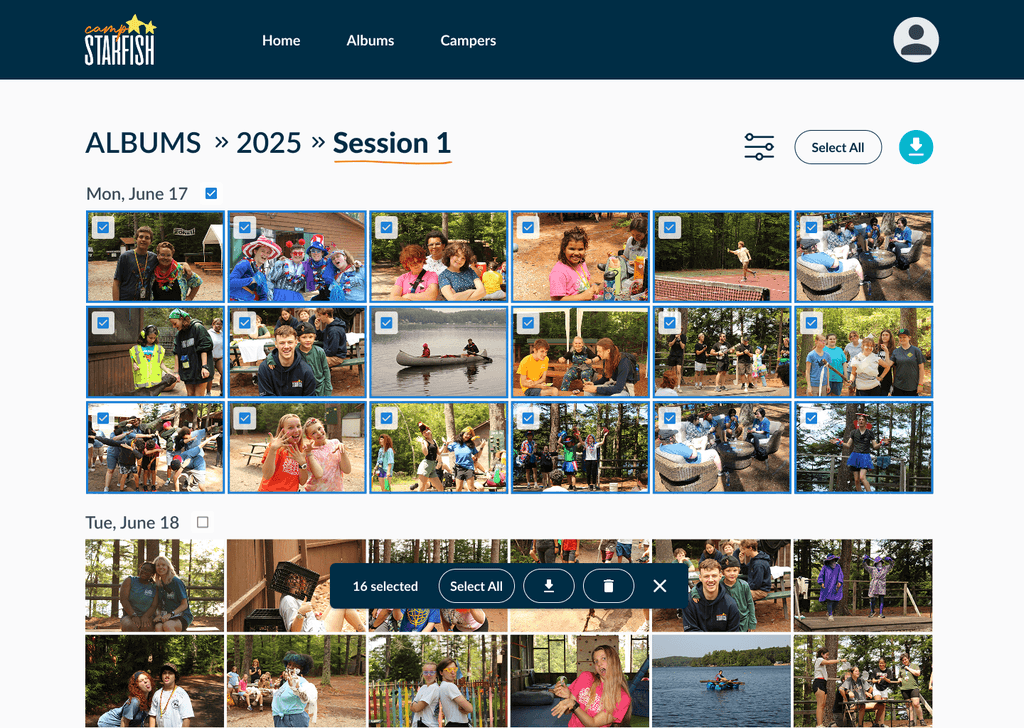
Some users struggled locating the toolbar.
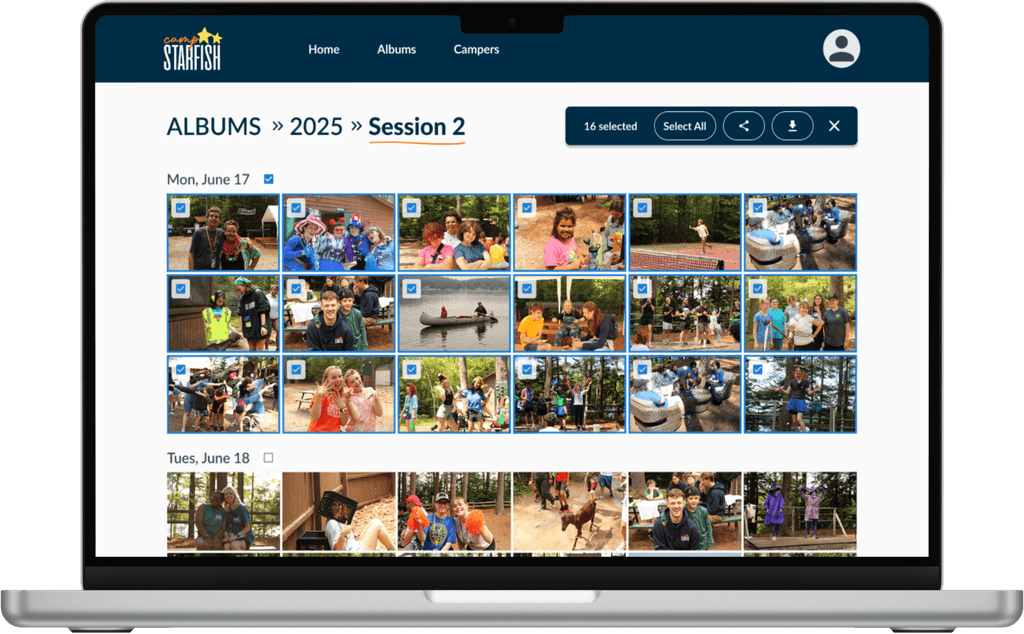
Moved to a more visible and intuitive placement, similar to Google Drive.
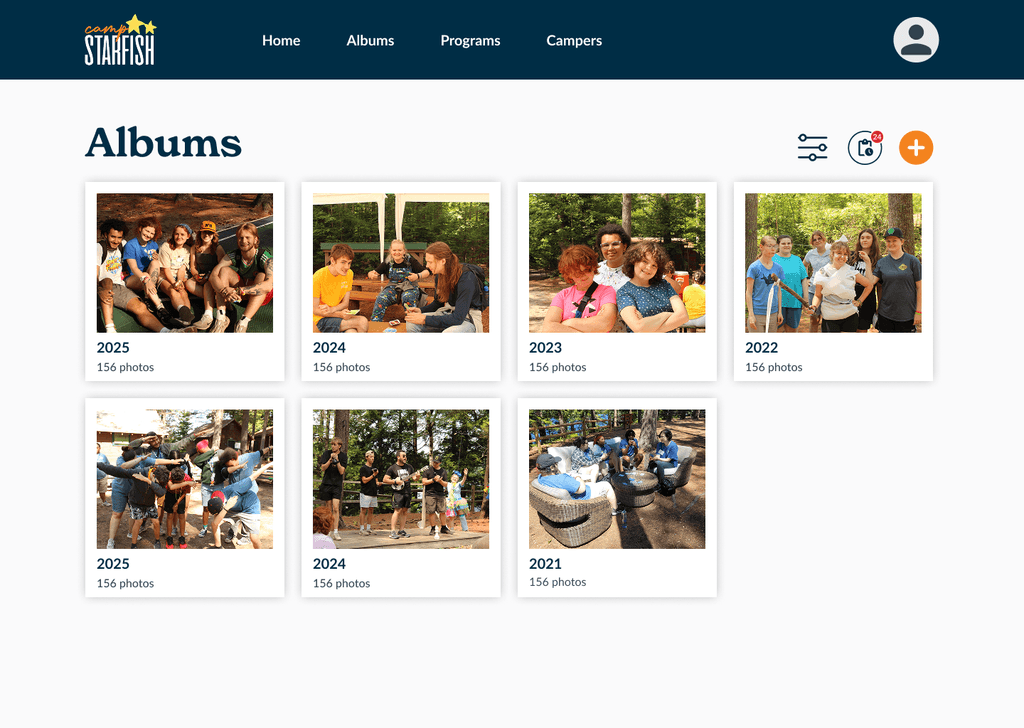
Users struggled to locate the pending photos page.
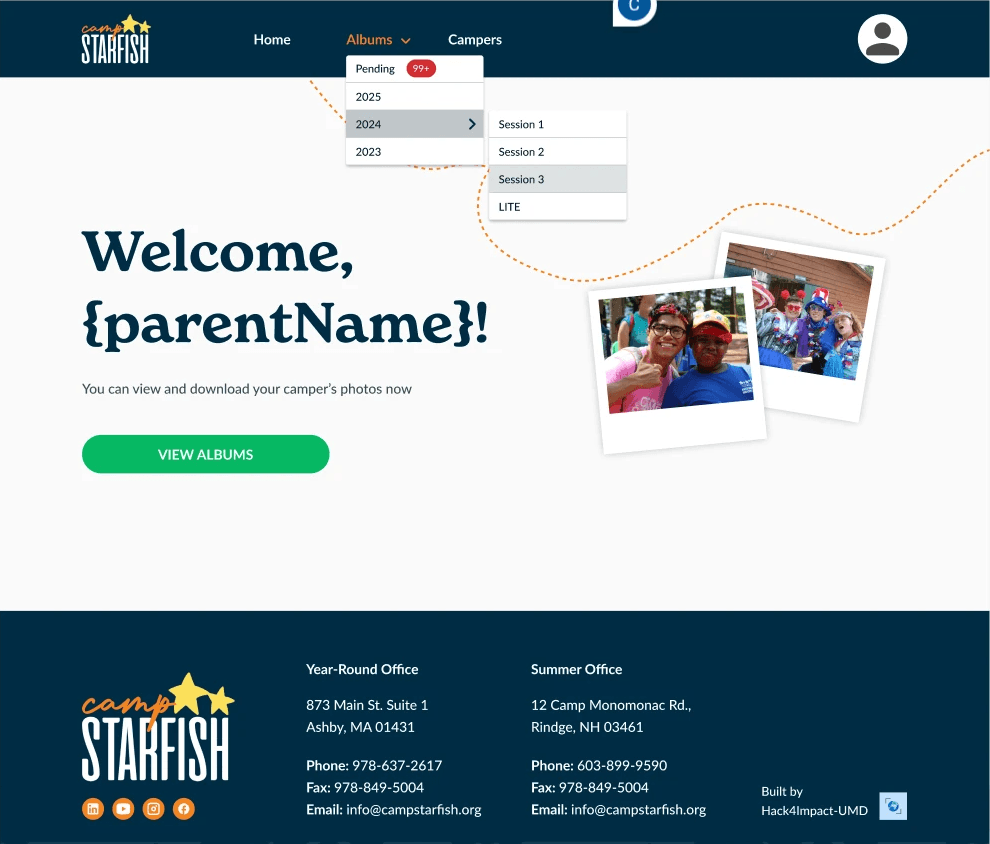
Added “Pending Photos” page access to the main navigation as we noticed users intuitively tried to access that page from the navbar.
All users gave positive feedback on the interface’s clarity and ease of use. Usability testing confirmed they could easily upload, organize, access, and manage photos with minimal guidance.
User Testing & Iterations
We conducted 5 remote usability sessions and 3 in-depth surveys across all user roles to uncover any pain points with the new user flow.
Due to time and location constraints, we utilized remote methods to test our assumptions and ensure the design fulfilled user needs.
We had users run through tasks such as:
Uploading + tagging (admin/staff)
Viewing albums (parents)
Navigation + photo management (all roles)
Some key findings:
Some users struggled locating the toolbar.
Moved to a more visible and intuitive placement, similar to Google Drive.
Users struggled to locate the pending photos page.
Added “Pending Photos” page access to the main navigation as we noticed users intuitively tried to access that page from the navbar.
All users gave positive feedback on the interface’s clarity and ease of use. Usability testing confirmed they could easily upload, organize, access, and manage photos with minimal guidance.
User Testing & Iterations
We conducted 5 remote usability sessions and 3 in-depth surveys across all user roles to uncover any pain points with the new user flow.
Due to time and location constraints, we utilized remote methods to test our assumptions and ensure the design fulfilled user needs.
We had users run through tasks such as:
Uploading + tagging (admin/staff)
Viewing albums (parents)
Navigation + photo management (all roles)
Some key findings:
Some users struggled locating the toolbar.
Moved to a more visible and intuitive placement, similar to Google Drive.
Users struggled to locate the pending photos page.
Added “Pending Photos” page access to the main navigation as we noticed users intuitively tried to access that page from the navbar.
All users gave positive feedback on the interface’s clarity and ease of use. Usability testing confirmed they could easily upload, organize, access, and manage photos with minimal guidance.
1.
Research
2.
Ideation
3.
Wireframes
& Prototypes
4.
Iteration & User Testing
5.
Branding & UI
1.
Research
2.
Ideation
3.
Wireframes
& Prototypes
4.
Iteration & User Testing
5.
Branding & UI
1.
Research
2.
Ideation
3.
Wireframes
& Prototypes
4.
Iteration & User Testing
5.
Branding & UI
Visual Design: Prioritizing Accessibility, Incorporating Branding
I led the creation of the project’s design system, ensuring consistency across our work and Camp Starfish’s branding.
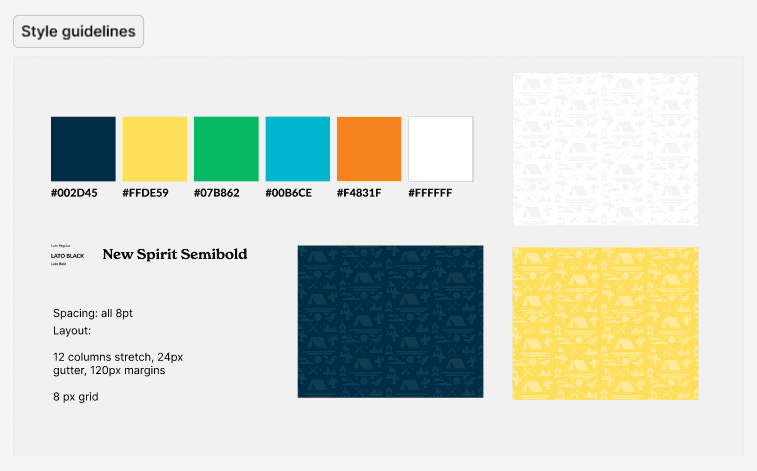
UI aligned with Camp Starfish’s brand (color palette, fonts)
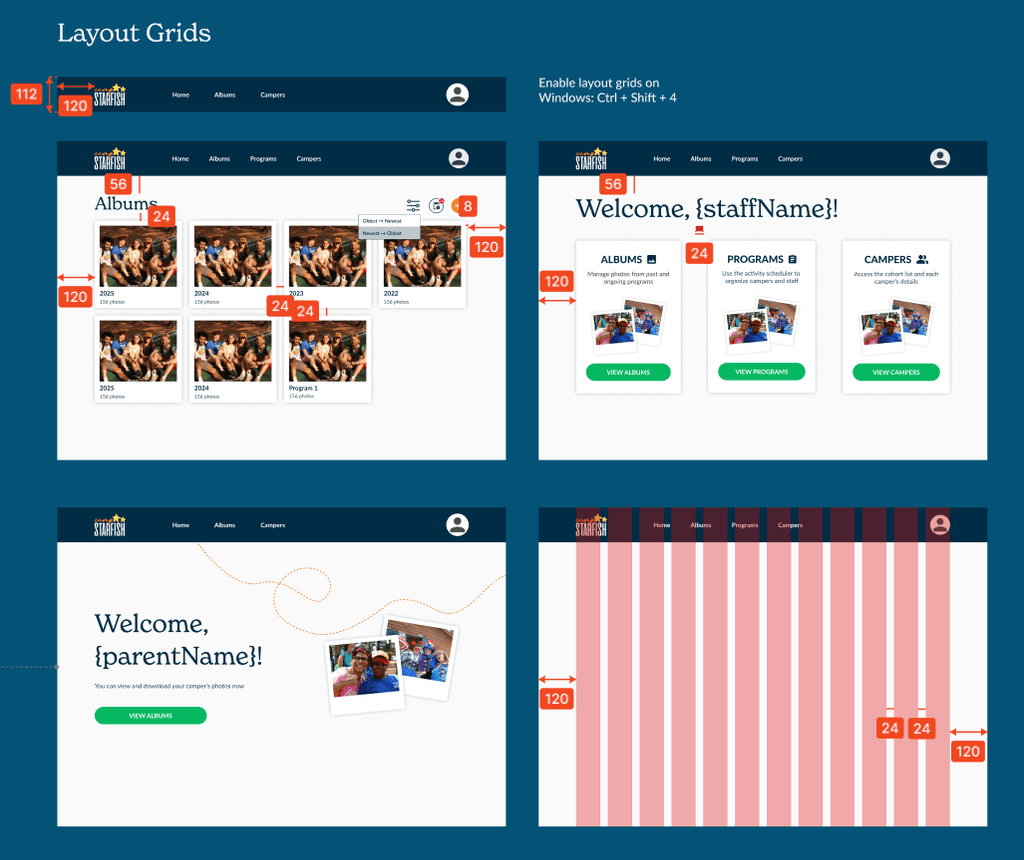
Focus on accessibility (WCAG contrast checks)
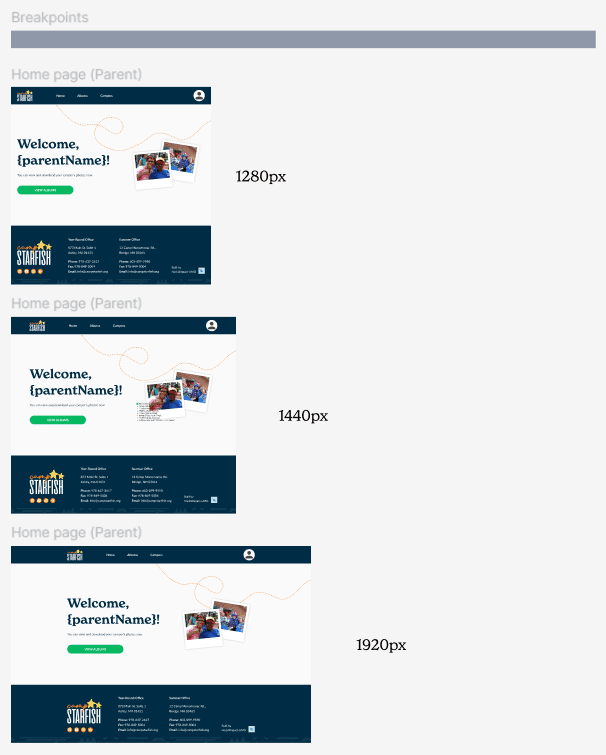
Responsive layout with clear hierarchy and action feedback
Visual Design: Prioritizing Accessibility, Incorporating Branding
I led the creation of the project’s design system, ensuring consistency across our work and Camp Starfish’s branding.
UI aligned with Camp Starfish’s brand (color palette, fonts)
Focus on accessibility (WCAG contrast checks)
Responsive layout with clear hierarchy and action feedback
Visual Design: Prioritizing Accessibility, Incorporating Branding
I led the creation of the project’s design system, ensuring consistency across our work and Camp Starfish’s branding.
UI aligned with Camp Starfish’s brand (color palette, fonts)
Focus on accessibility (WCAG contrast checks)
Responsive layout with clear hierarchy and action feedback
Final Screens
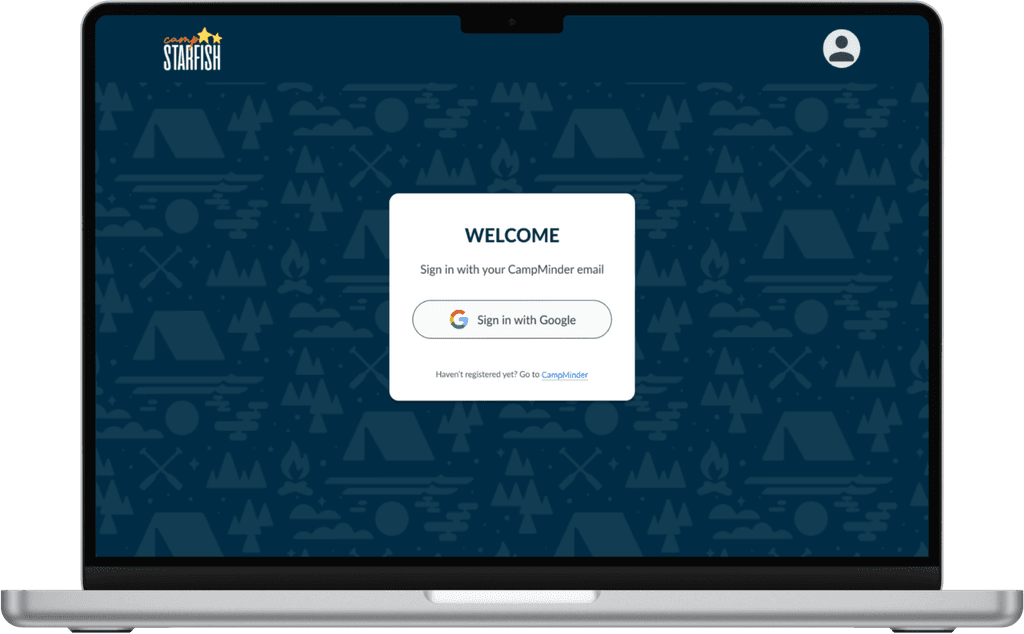
Secure Login
Implementing Auth0 for authentication and integrating existing user emails ensured the app met privacy requirements while scaling with third-party tools.
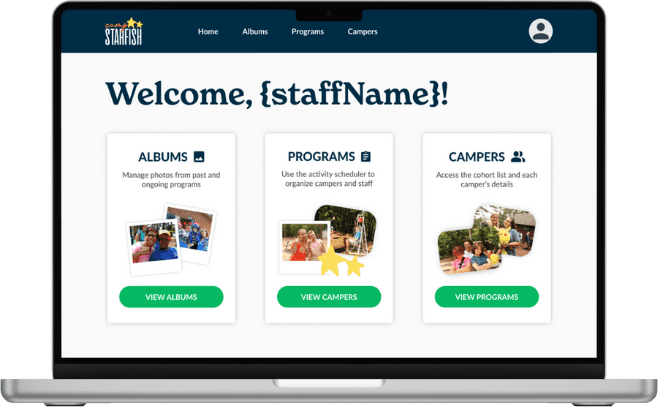
Staff Home Page
This page guides staff to key tasks and features they can perform within the app.
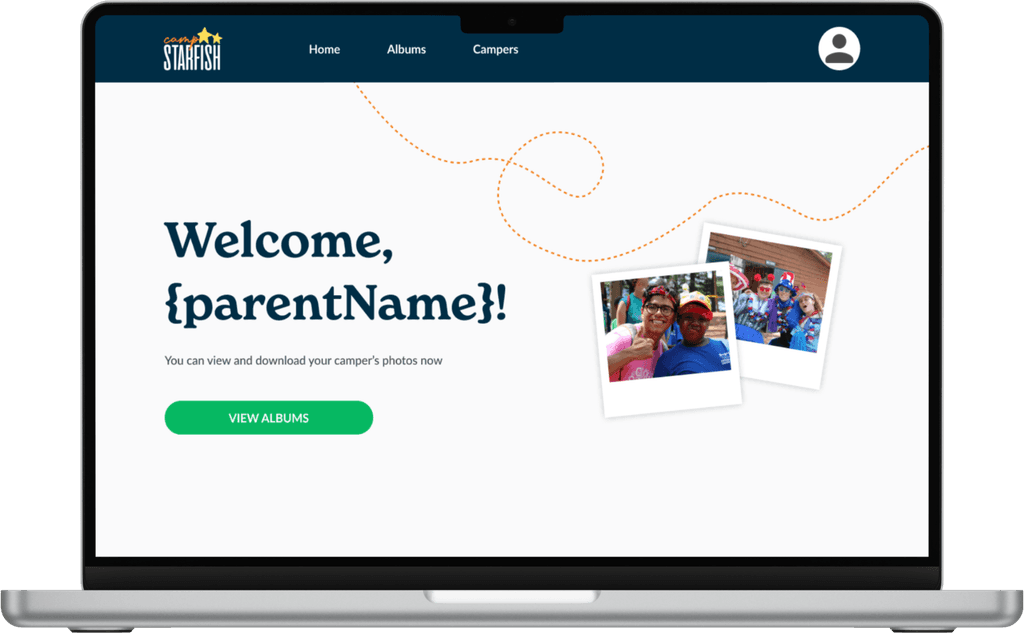
Parent Home Page
The parent version is designed with a warm, visual feel aligned to Camp Starfish's branding, building trust with users.
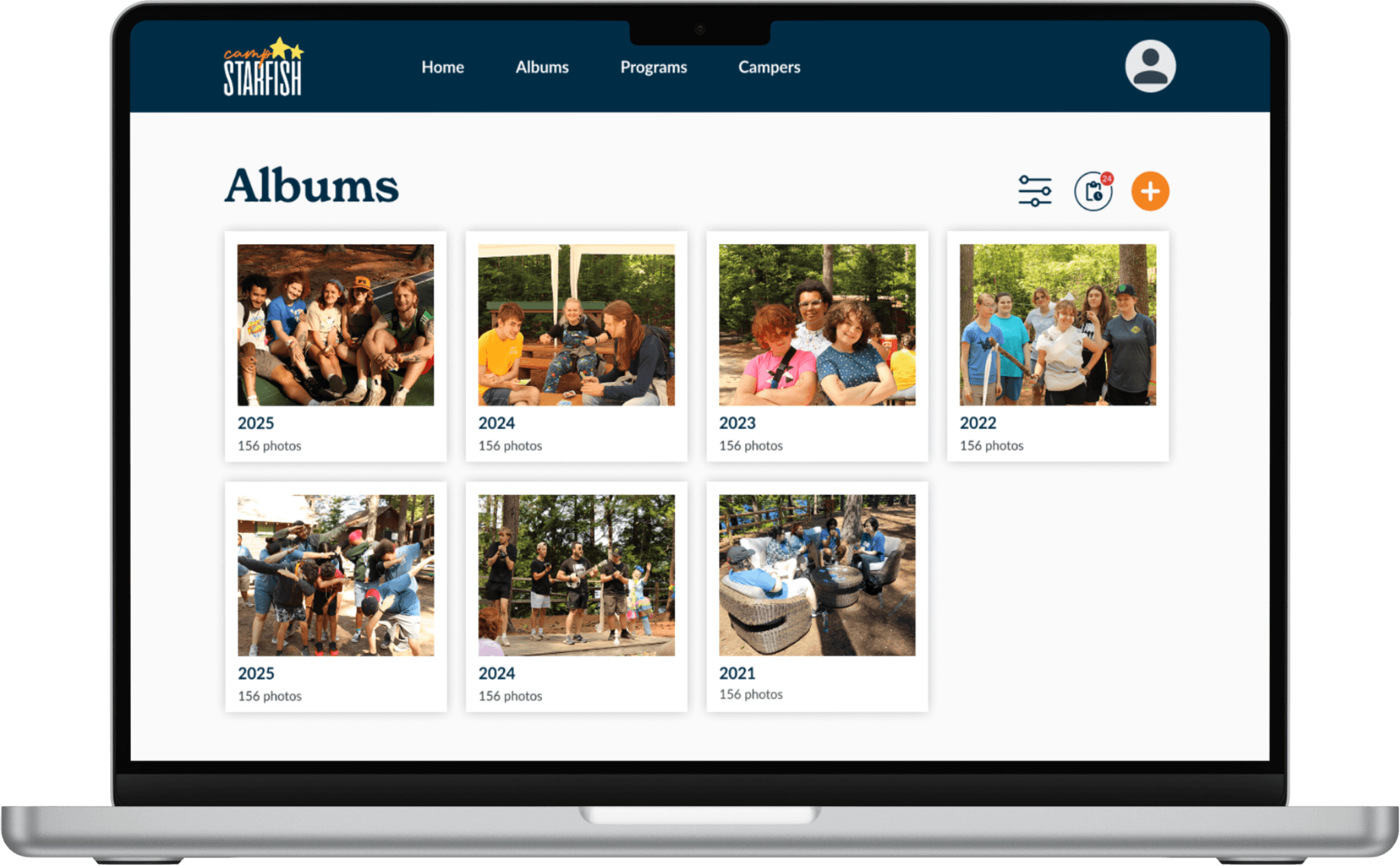
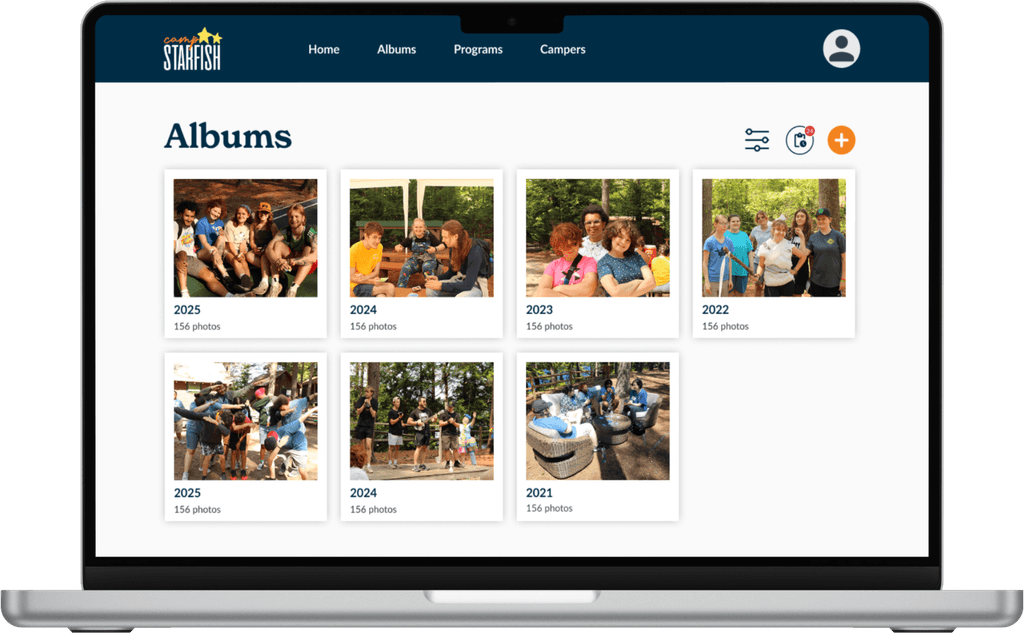
Albums Page (Camp Admin Version)
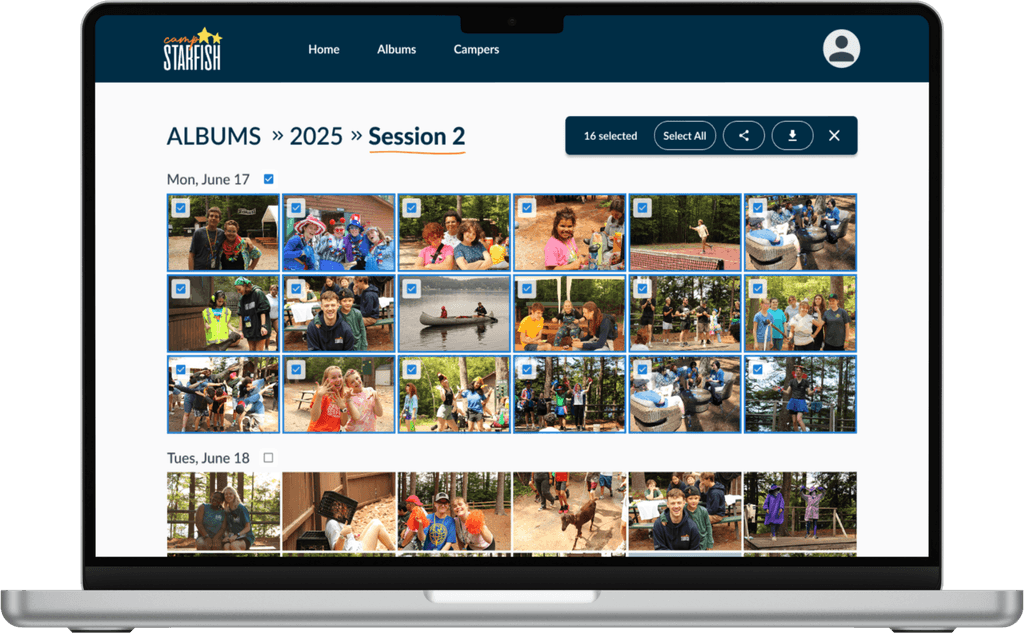
We categorized photos around users’ mental models to reduce cognitive load, sorting albums by year and program so both staff and parents could easily navigate large photo sets. The parent flow is very similar, excluding only the album creation, tagging, and upload features.
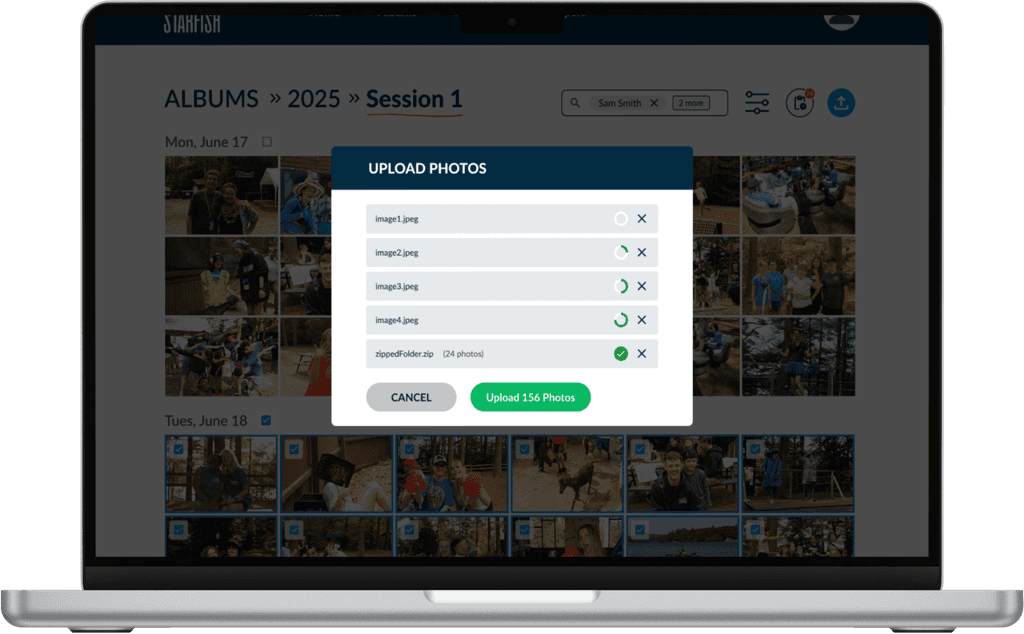
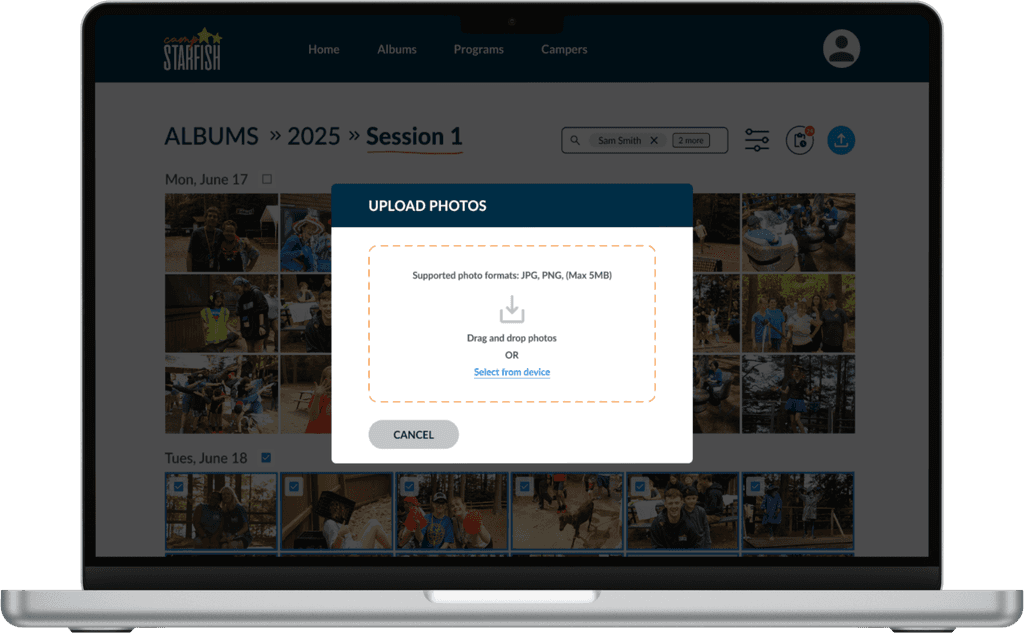
Upload Flow
We made sure to add feedback cues (loading animations, checkmarks) and edge case states.
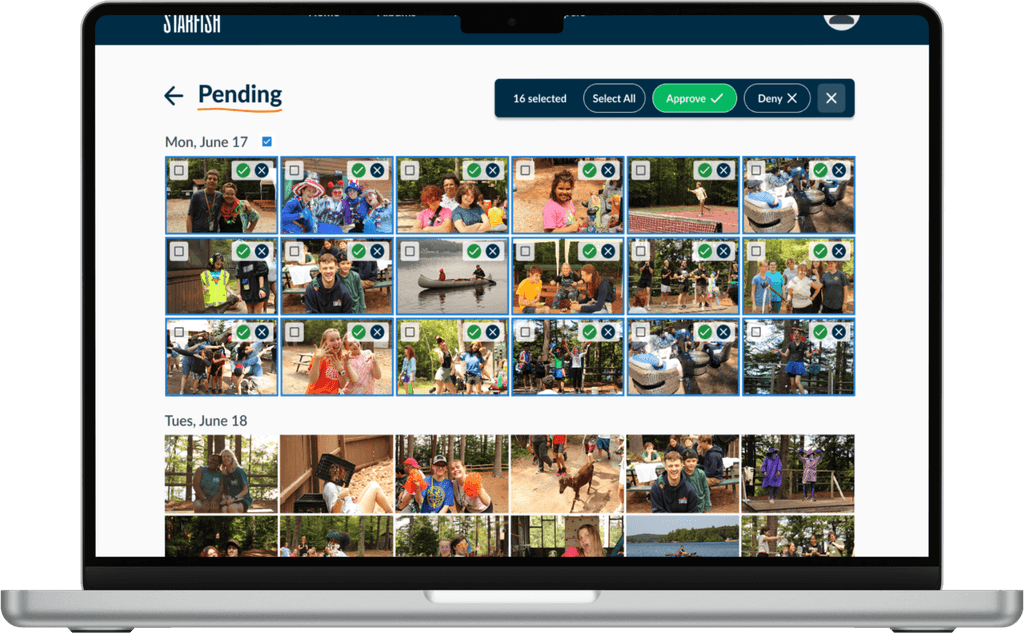
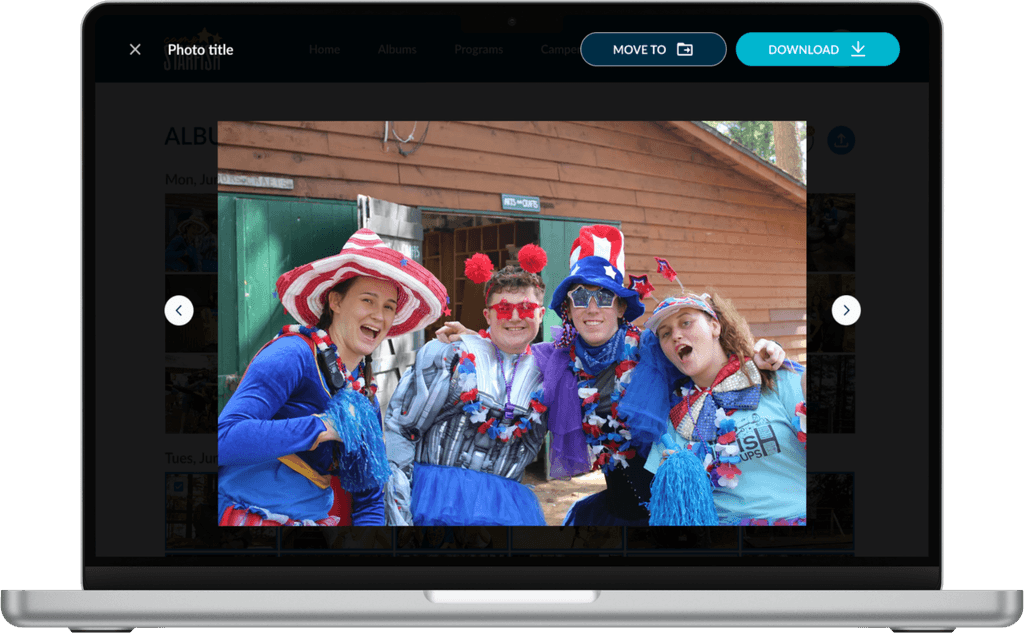
Pending Photos Page
Camp Admin can review photos tagged by Camp Staff and approve or deny them before they appear in the parent portal.
Familiar Patterns
We referenced Google Drive’s UI and behaviors to ensure intuitive use for returning users.
Final Screens
Secure Login
Implementing Auth0 for authentication and integrating existing user emails ensured the app met privacy requirements while scaling with third-party tools.
Staff Home Page
This page guides staff to key tasks and features they can perform within the app.
Parent Home Page
The parent version is designed with a warm, visual feel aligned to Camp Starfish's branding, building trust with users.
Albums Page (Camp Admin Version)
We categorized photos around users’ mental models to reduce cognitive load, sorting albums by year and program so both staff and parents could easily navigate large photo sets. The parent flow is very similar, excluding only the album creation, tagging, and upload features.
Upload Flow
We made sure to add feedback cues (loading animations, checkmarks) and edge case states.
Pending Photos Page
Camp Admin can review photos tagged by Camp Staff and approve or deny them before they appear in the parent portal.
Familiar Patterns
We referenced Google Drive’s UI and behaviors to ensure intuitive use for returning users.
Final Screens
Secure Login
Implementing Auth0 for authentication and integrating existing user emails ensured the app met privacy requirements while scaling with third-party tools.
Staff Home Page
This page guides staff to key tasks and features they can perform within the app.
Parent Home Page
The parent version is designed with a warm, visual feel aligned to Camp Starfish's branding, building trust with users.
Albums Page (Camp Admin Version)
We categorized photos around users’ mental models to reduce cognitive load, sorting albums by year and program so both staff and parents could easily navigate large photo sets. The parent flow is very similar, excluding only the album creation, tagging, and upload features.
Upload Flow
We made sure to add feedback cues (loading animations, checkmarks) and edge case states.
Pending Photos Page
Camp Admin can review photos tagged by Camp Staff and approve or deny them before they appear in the parent portal.
Familiar Patterns
We referenced Google Drive’s UI and behaviors to ensure intuitive use for returning users.
Results
1.
Time-Consuming Tagging
One intern spent ~8 hrs/day tagging images…
2.
Poor Organization
Duplicates, lost images, and inconsistent labeling.
3.
Privacy Concerns
Managing permissions for individual images increased risk of accidental oversharing, raising important privacy concerns.
4.
Lack of Scalable Tools
Existing tools like CampMinder were expensive and inflexible.
76% Faster Photo Tagging
Users expressed improved navigation of photos with the new photo management tool
$3,000 saved for Camp Starfish
Secure and acessible photo management for both staff and parents
Results
1.
Time-Consuming Tagging
One intern spent ~8 hrs/day tagging images…
2.
Poor Organization
Duplicates, lost images, and inconsistent labeling.
3.
Privacy Concerns
Managing permissions for individual images increased risk of accidental oversharing, raising important privacy concerns.
4.
Lack of Scalable Tools
Existing tools like CampMinder were expensive and inflexible.
76% Faster Photo Tagging
Users expressed improved navigation of photos with the new photo management tool
$3,000 saved for Camp Starfish
Secure and acessible photo management for both staff and parents
Results
1.
Time-Consuming Tagging
One intern spent ~8 hrs/day tagging images…
2.
Poor Organization
Duplicates, lost images, and inconsistent labeling.
3.
Privacy Concerns
Managing permissions for individual images increased risk of accidental oversharing, raising important privacy concerns.
4.
Lack of Scalable Tools
Existing tools like CampMinder were expensive and inflexible.
76% Faster Photo Tagging
Users expressed improved navigation of photos with the new photo management tool
$3,000 saved for Camp Starfish
Secure and acessible photo management for both staff and parents
In Conclusion…
The product is still in development and will launch in the coming months. Some features we are still working on include role-based permission management features. We look forward to its release!
In Conclusion…
The product is still in development and will launch in the coming months. Some features we are still working on include role-based permission management features. We look forward to its release!
In Conclusion…
The product is still in development and will launch in the coming months. Some features we are still working on include role-based permission management features. We look forward to its release!
"Working with the team at Hack4Impact has been amazing, and I’m so impressed with their work. Being able to share photos of smiling campers means everything to our families."
— Lydia Beeler, Program Director
"Working with the team at Hack4Impact has been amazing, and I’m so impressed with their work. Being able to share photos of smiling campers means everything to our families."
— Lydia Beeler, Program Director
"Working with the team at Hack4Impact has been amazing, and I’m so impressed with their work. Being able to share photos of smiling campers means everything to our families."
— Lydia Beeler, Program Director
My Reflections & Learnings
Catch Misalignment Early
Sometimes I would receive verbal agreement from stakeholders but sensed hesitation in their tone. I learned that asking clarifying questions is essential in making sure everyone is on the same page. Although it may feel awkward at times, it's important to address concerns early on before they become a bigger issue.
Provide Reasoning to Advocate for UX
Provide Reasoning, Advocate for UX
I learned that tying design decisions (like filtering & layout) to user needs and explaining why they were made helped gain buy-in from the devs, ensuring usability and accessibility were prioritized during implementation.
Backtrack When Needed
Early on, our design team was misaligned on the parent flow and rushed into the design too quickly. We notified our PMs that we needed more time to revisit our design decisions and get back on track, and made a plan that allowed us to advance while preventing bottlenecks. Staying transparent with our team and advocating for ourselves as designers helped ensure our app's features were intuitive and met user needs.